 Affonso
Want to share instructions with partners?
Pay affiliate commissions
No. Affonso does not pull funds from Stripe or Polar. Connecting a checkout processor tracks commissions. It does not auto-deduct, split, or send affiliate payouts.
You pay affiliates outside Affonso (PayPal, Wise, or bank), then Mark as Paid. Affonso charges no payout fee on any plan for those manual rails. Managed Payouts is a different job: you pay one Affonso invoice and Affonso pays affiliates (Growth plan or higher).
Payouts appear on Payouts → Pending after Payment Terms fire (monthly on the 1st, or weekly on Mondays). This page is the manual pay path.
Before you begin: you need pending rows under Open Payouts, and each affiliate should have payout details on file. Rows that show Not configured cannot be bulk-marked as paid until the affiliate adds a method.
Open Pending
Open Payouts → Pending. The sidebar group is Payouts; the tab is Pending.
Review Open Payouts
The card title is Open Payouts. Each row is a Pending payout for one affiliate: method, details, amount, and sales count.
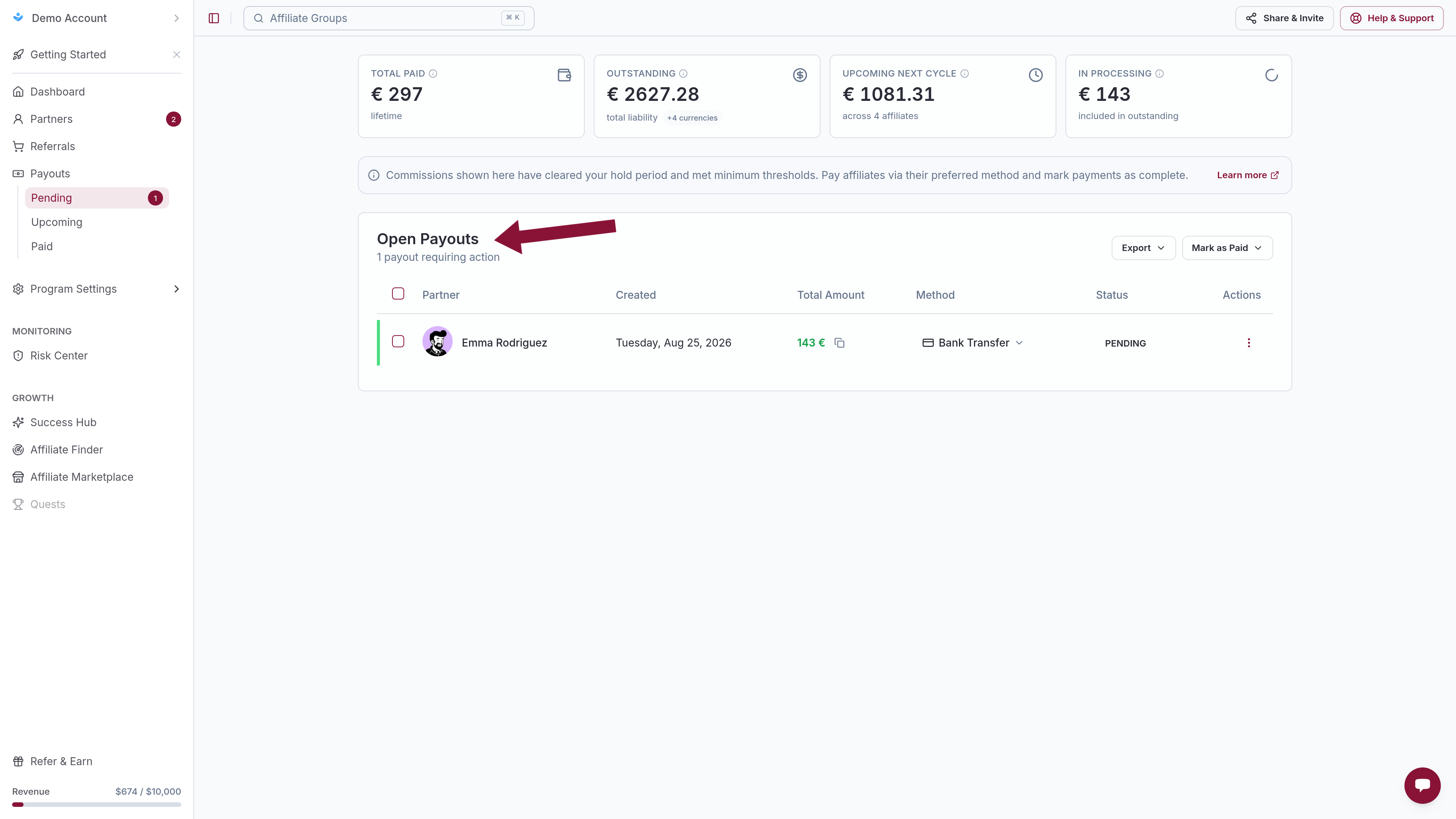
If Managed Payouts is on, this same page shows Managed Payouts for the Affonso-paid cycle. Leftover manual rows stay in a separate Open Payouts block. Pay those here, or switch the program to Managed.
Export by method
Click Export. Choose one of:
- Export PayPal
- Export Wise
- Export Wire Transfer
The menu is disabled for a method with zero matching payouts. Pay that CSV in PayPal, Wise, or your bank — outside Affonso.
Mark as Paid
After the money has left your PayPal, Wise, or bank account, return to Open Payouts.
On one row: Mark as Paid. For several rows, open Mark as Paid and choose Mark all selected as Paid, Mark all payments as Paid, or Mark all PayPal as Paid (same pattern for Wise, Wire Transfer, and other methods that have rows).
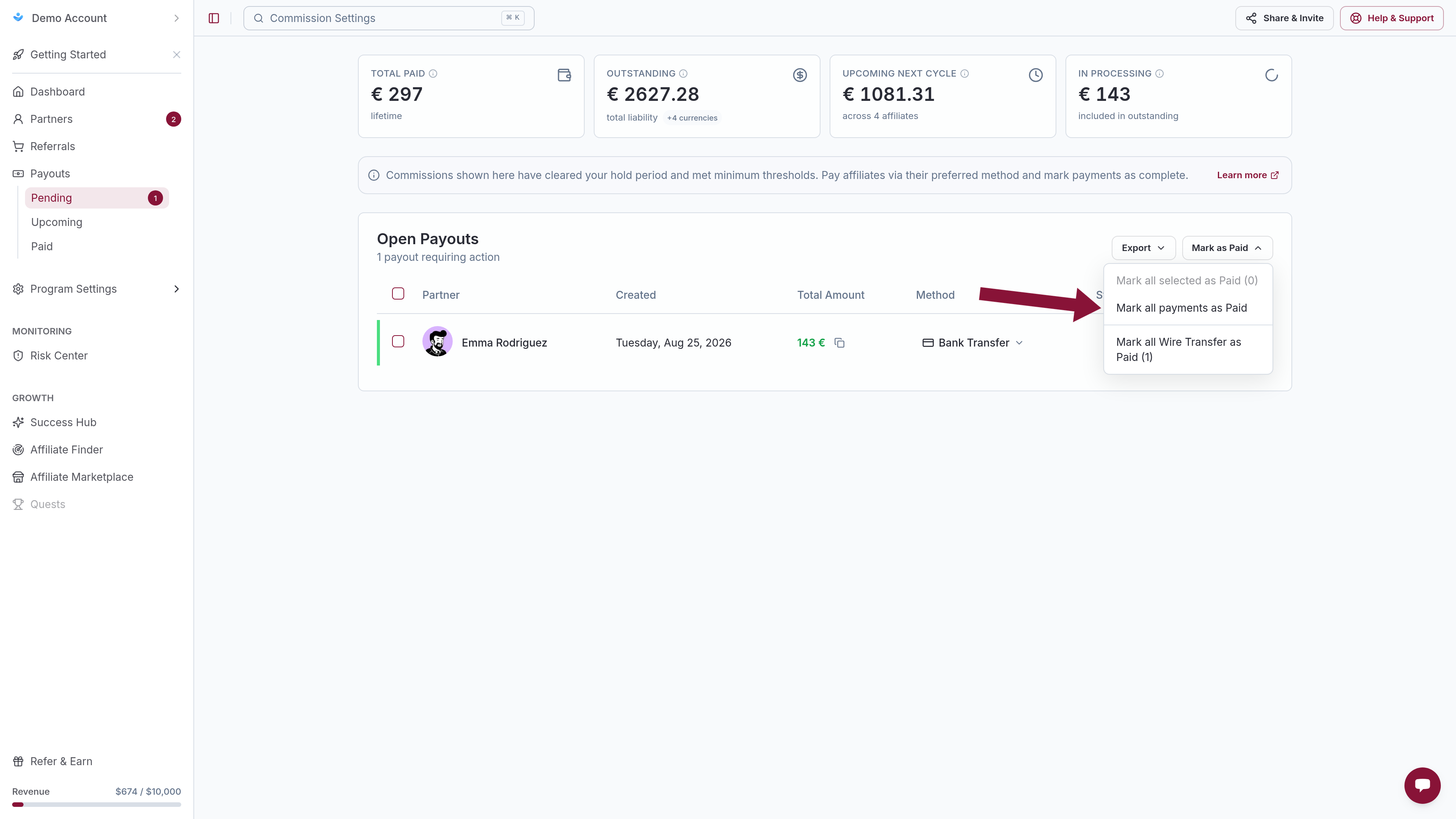
That records the payout as Paid. It does not move funds.
To drop a generated payout without paying it, see Cancel a pending payout. To pay on a date that is not the schedule, see Manually Generate Payouts.
Common issues
Stripe or Polar already charged the customer. Why wasn't the affiliate paid?
Cause: Checkout webhooks create commissions. They do not send affiliate payouts.
Solution: Pay the Open Payouts rows yourself (this page), or enable Managed Payouts so Affonso invoices you and pays affiliates.
Does Affonso charge a fee to pay via PayPal, Wise, or bank?
Cause: Managed invoice fees are sometimes mixed up with manual rails.
Solution: Manual PayPal / Wise / wire exports have no Affonso payout fee on any plan. Provider fees (PayPal, Wise, the bank) are theirs. Managed fees apply only when Managed Payouts is on.
Cannot change payout currency
Cause: Payout currency on Affiliate Program → Payment Terms is set when the program is created and the control is disabled after that. Managed invoices and affiliate disbursements are USD even if commissions were calculated in another currency.
Solution: There is no in-app control to switch currency after create (for example EUR, INR, or a merchant invoice in € vs $). For Managed, expect the Affonso invoice in USD. For manual payouts, the CSV uses the program currency.
Export is empty for a method
Cause: No Pending payout uses that method, or the affiliate still shows Not configured.
Solution: Confirm the affiliate saved PayPal, Wise, or Wire Transfer under portal payout details. Use Send Reminder Email on Not configured rows.
Mark as Paid is blocked
Cause: Missing payout details, or tax forms blocking the earning.
Solution: Wait for the affiliate to add a method, or open Blocked by tax forms on the same page and finish tax review. Then Mark as Paid again.
Related
Was this article helpful?

Ready to grow your business
through partnerships?
Find the right partners, help them promote, and turn their work into measurable revenue.